Data - 3 things you should know before using the MySQL or PostgreSQL connectors
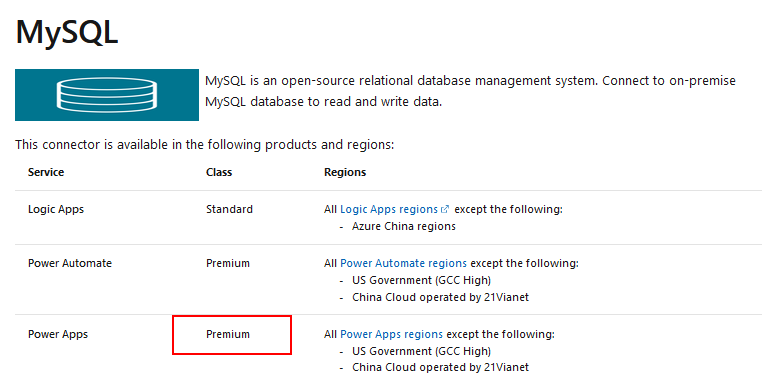
Power Apps provides basic connectivity to MySQL and PostgreSQL databases - two of the most popular open source databases.
The documentation for these connectors are beneath:
1 - MySQL and PostgreSQL require a premium license plan
This is a frequently requested feature, and it is something that you can vote for here:
The documentation for these connectors are beneath:
https://docs.microsoft.com/en-us/connectors/mysql/
https://docs.microsoft.com/en-us/connectors/postgresql/
https://docs.microsoft.com/en-us/connectors/postgresql/
If you're thinking of using these connectors, here are the top 3 things you should be aware of.
1 - MySQL and PostgreSQL require a premium license plan
Both the MySQL and PostgreSQL connectors are premium connectors. This means that each user requires a per user or per app license at $10/$40 per user per month respectively.
For some app builders, this can conflict with the reason why they choose these data sources - which is to access a relational database in a low-cost way.
Therefore, it's important to factor the cost of premium licensing when we consider using MySQL or PostgreSQL with Power Apps.
For some app builders, this can conflict with the reason why they choose these data sources - which is to access a relational database in a low-cost way.
Therefore, it's important to factor the cost of premium licensing when we consider using MySQL or PostgreSQL with Power Apps.
2 - MySQL and PostgreSQL work only through an premise gateway
Both the MySQL and PostgreSQL connectors work only through an on-premise gateway. This means that we must install the gateway on a computer that is always switched on, and this is an additional component that we must manage.
It's not possible to connect directly to an instance of that is accessible through the cloud or the web. An example of this is an instance of a MySQL and PostgreSQL database that is hosted in Amazon AWS or Azure.
It's not possible to connect directly to an instance of that is accessible through the cloud or the web. An example of this is an instance of a MySQL and PostgreSQL database that is hosted in Amazon AWS or Azure.
This is a frequently requested feature, and it is something that you can vote for here:
https://powerusers.microsoft.com/t5/Power-Apps-Ideas/MySQL-connector-connectivity/idi-p/133968
3 - Tables with 'auto increment' primary key columns are not fully supported
Finally, one of the biggest limitations of the MySQL and PostgreSQL connectors is that it is not possible to add records to tables with 'auto increment' primary key fields.
3 - Tables with 'auto increment' primary key columns are not fully supported
Finally, one of the biggest limitations of the MySQL and PostgreSQL connectors is that it is not possible to add records to tables with 'auto increment' primary key fields.
When we attempt to patch or to add a record to a table with an 'auto increment' primary key field, we receive an error from Power Apps that prompts us to pass a primary key field value. This is incorrect because the database is set to automatically generate the primary key field value.
There are several posts about this issue.
https://powerusers.microsoft.com/t5/Building-Power-Apps/MySQL-Auto-Increment-Primary-Key-Incompatibility/m-p/408532
https://powerusers.microsoft.com/t5/Building-Power-Apps/Using-Collect-to-upload-multiple-rows-to-PostgresSQL-database/m-p/582508
https://powerusers.microsoft.com/t5/Building-Power-Apps/Writing-data-into-PostgreSQL-database-results-in-AutoIncrement/m-p/743699
https://powerusers.microsoft.com/t5/Building-Power-Apps/Using-Collect-to-upload-multiple-rows-to-PostgresSQL-database/m-p/582508
https://powerusers.microsoft.com/t5/Building-Power-Apps/Writing-data-into-PostgreSQL-database-results-in-AutoIncrement/m-p/743699
It would be great if Microsoft could fix this problem. However, I suspect this has always been a low priority issue because Microsoft's focus will be on a Dataverse, and other Power App features that are focused around the Microsoft ecosystem, and features that can generate more sales or income for Microsoft.
Therefore, I have created a post in the ideas forum which I hope will raise awareness. If MySQL and PostgreSQL support is important to you, I would recommend that you vote for the idea beneath.
Conclusion
If you're thinking of connecting to MySQL or PostgreSQL databases, it's important to be aware that the corresponding connectors are premium connectors which require a premium license plan. Second, these connectors work only through the on-premise gateway. Most importantly, there is a bug that prevents us from adding records to tables with primary key columns that are set to 'auto increment'.
