Does Power Apps still support Internet Explorer (IE) - 2020?
How many users use IE and why?
The use of Internet Explorer is diminishing. Statistics from this month (May 2020) highlight IE's market share at around 5%. This provides a ballpark value of the number of users that use IE.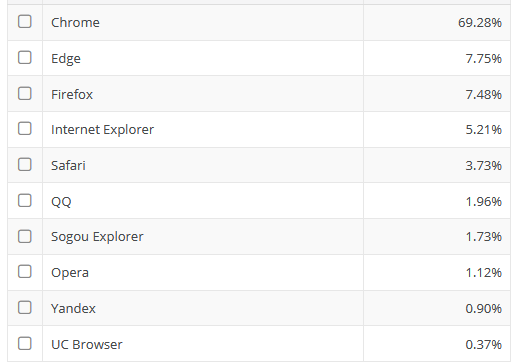
IE also supports the ability to open local files and UNC file paths through file links (eg, hyperlinks that look like this file://server/share/file.txt ). This is a feature that is used commonly in intranet systems, and a feature that doesn't work on Chrome/Edge due to security limitations.
Users that rely on IE to carry out a job can prefer to use IE exlusively, to avoid switching between browsers.
Does Power Apps still support IE?
As of today (May 2020), Power Apps still supports IE. However, this won't be for much longer. Microsoft has announced the deprecation of IE support, and the Power Platform will no longer support IE officially beyond August 2021.
Effective December 2020, Microsoft Internet Explorer 11 support for Microsoft Dynamics 365 and Microsoft Power Platform is deprecated, and Internet Explorer 11 won’t be supported after August 2021.
This will impact customers who use Dynamics 365 and Microsoft Power Platform products that are designed to be used through an Internet Explorer 11 interface. After August 2021, Internet Explorer 11 won't be supported for such Dynamics 365 and Microsoft Power Platform products. We recommend that customers transition to Microsoft Edge.
What browsers does Power Apps support in 2020?
The desktop browsers that Power Apps currently supports are as follows:- Google Chrome Latest three major releases
- Microsoft Edge Latest three major releases
- Microsoft Internet Explorer 11 (with Compatibility View off)
- Mozilla Firefox (latest version) Latest three major releases
- Apple Safari 13 and later
We can find full details, and an up-to-date list through the following link
What known problems are there?
Since IE 11 is still supported, there are few major issues. The main requirement is that IE compatibility mode must not be enabled.
https://support.microsoft.com/en-us/windows/fix-site-display-issues-with-compatibility-view-in-internet-explorer-11-9a0a3a6e-89be-518f-ff56-c491b528b302
If users experience problems with IE, the first step is to check is that the users have installed the most up-to-date version of IE 11.
The most common problems relate to functionality and appearance when Power Apps are embedded in links or iframes.
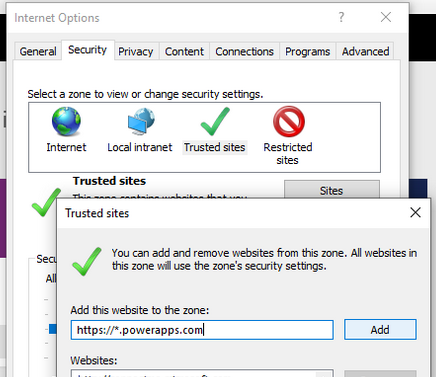
Besides presentational issues, there are occasions where users suffer from IE related authentication glitches, which typically involves an endless authentication loop. Adding the Power Apps websites as trusted sites can mitigate these rare issues.
How to force an App/hyperlink to open in Microsoft Edge
<a href="microsoft-edge:https://apps.powerapps.com/play/<appID>?tenantId=<tenantID>">
   Open PowerApp with with Edge browser
</a>
