Data - How to implement circular rotational date sorting
An interesting requirement that can arise is the requirement to implement circular sorting. This occurs typically when we want to sort date ranges based on today's date.
For example, given an input list of data, if today is Wednesday, a circular sort implementation will sort records starting with Wednesday, followed by Thursday, Friday, Saturday, Sunday, Monday, and finally Tuesday.
For reference, there are a couple of forum posts that provide more details.
How to apply circular sorting based on weekday name
To give an example, let's take a list of meeting hosts.
ClearCollect(The requirement is to show the meeting hosts for the next 7 days, starting from today's date.
colMeetingHosts,
{DayName:"Monday", MeetingHost:"John Smith"},
{DayName:"Tuesday", MeetingHost:"Mary Jones"},
{DayName:"Wednesday", MeetingHost:"Robert Lee"},
{DayName:"Thursday", MeetingHost:"Lisa Chen"},
{DayName:"Friday", MeetingHost:"James Wilson"},
{DayName:"Saturday", MeetingHost:"Sarah Green"},
{DayName:"Sunday", MeetingHost:"David Miller"}
)
With this example data, we would need to convert the day names to numbers to implement the sort. The formula would look like this.
ClearCollect(colMeetingHostsDays,
             AddColumns(
                colMeetingHosts,
                "DayNum",
                Switch(
                  DayName,
                  "Monday", 1,
                  "Tuesday", 2,
                  "Wednesday", 3,
                  "Thursday", 4,
                  "Friday", 5,
                  "Saturday", 6,
                  "Sunday", 7
                )
             )
)
This produces the following result:
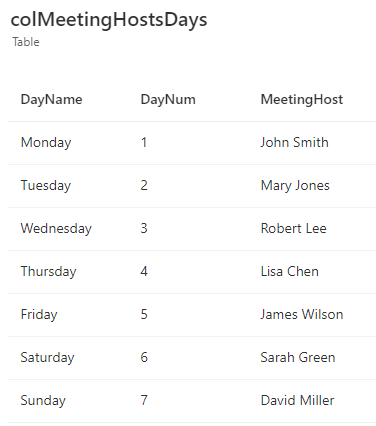
We can then sort the result like so.
Sort(
colMeetingHostsDays,If(DayNum < Weekday(Today(), StartOfWeek.Monday), "b" & Text(YourWeekNumCol), "a" & Text(YourWeekNumCol) ), SortOrder.Ascending
)
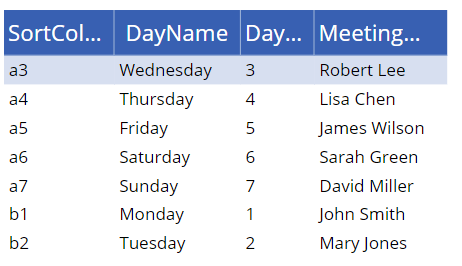
The theory here is to build a calculated 'sort' column. Let's say that today is Wednesday. We would prefix days 3 and above with 'a', and days under 3 with 'b'. We can then carry out an 'alpha' sort to return the days in the desired sequence.
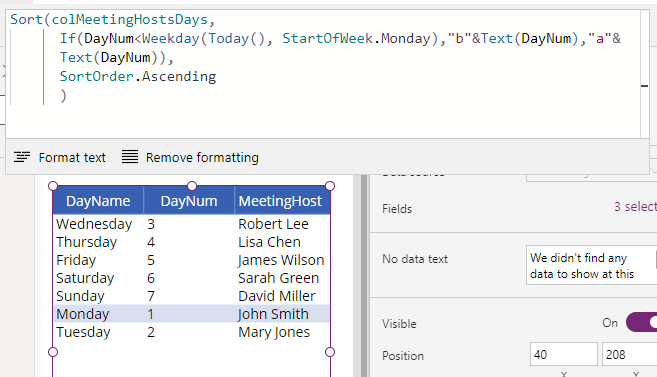
To clarify this further, this screenshot shows the calculated sort value to illustrate how the data is sorted.
How to apply circular sorting based on month name
To give another example, here's a list of public holidays for the year.
ClearCollect(
  colPublicHolidays,
  {MonthName: "January", Holiday: "New Year's Day"},
  {MonthName: "January", Holiday: "Martin Luther King Jr. Day"},
  {MonthName: "February", Holiday: "Presidents' Day"},
  {MonthName: "March", Holiday: ""},
  {MonthName: "April", Holiday: "Good Friday"},
  {MonthName: "April", Holiday: "Easter"},
  {MonthName: "May", Holiday: "Memorial Day"},
  {MonthName: "June", Holiday: ""},
  {MonthName: "July", Holiday: "Independence Day"},
  {MonthName: "August", Holiday: ""},
  {MonthName: "September", Holiday: "Labor Day"},
  {MonthName: "October", Holiday: "Columbus Day"},
  {MonthName: "November", Holiday: "Veterans Day"},
  {MonthName: "November", Holiday: "Thanksgiving Day"},
  {MonthName: "December", Holiday: "Christmas Day"}
)
To display the public holidays for the next 12 months starting with today's month, we would use this formula.
Sort(
    colPublicHolidays,
    With({MonthNum:Month(DateValue("1 " & MonthName & " 2024"))},
      If(MonthNum < Month(Today()),
         "b" & Text(MonthNum, "00"),
         "a" & Text(MonthNum, "00")
      )
    ),
    SortOrder.Ascending
)
Again, we sort by a calculated 'sort' column.
We use the technique here to convert the month names (eg January, February) to month numbers.
When we create the calculated sort column, note how we need to apply a Text format of "00". This ensures that the month numbers 1-9 are formatted as 01-09 to ensure that the sort takes account of months 10,11, and 12 correctly.
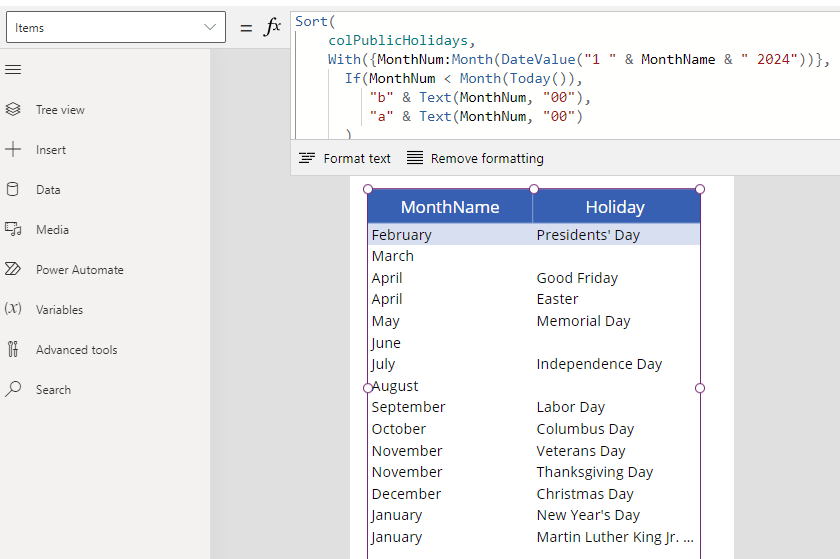
The final result looks like this based on today's month (February). We can see here how the January records appear at the end of the list.
Conclusion
To implement circular sorting, we can call the Sort function and sort by a calculated expression. This post provided two examples of how to implement this type of sorting.
