SharePoint - What you need to know about Filtering Data
If you're building an app with a SharePoint data source, it's important to be aware of bugs and issues that can affect the filtering of data. These limitations can make it difficult to build search features or to build screens that show the data that you desire.
1 - Filtering dates with the equality operator doesn't work
If you want to show records that match a specific date, there is a bug that prevents this from working. If we use the equals (=) operator against a date field in SharePoint, PowerApps returns the error:
"The requested operation is invalid: Server Response: The expression 'fieldname eq date criteria' is not valid.
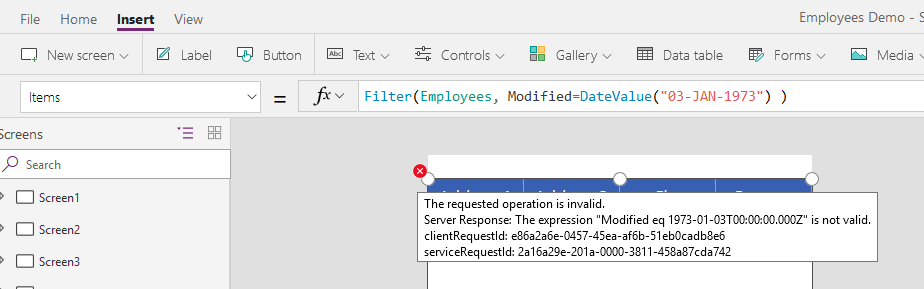
Although the equality operator doesn't work, other operators such as <, <=, >, => do work. But if you're thinking of combining the 'greater than' and 'less than' operators to solve this problem, you're sadly out of luck. These operators are not delegable, which means that we can't practically use these operators to search data sets with more than 2000 rows.
Here is a link on the forums with more details:
https://powerusers.microsoft.com/t5/General-Discussion/Filter-SharePoint-list-date-column-using-date-picker-with/td-p/63938 Note that this is a bug that also affects SQL Server data sources.
2 - Filtering boolean (Yes/No) fields doesn't work
There is a bug that prevents us from filtering yes/no SharePoint columns. If we attempt to filter by a yes/no field, PowerApps returns no data. As the screenshot beneath shows, this query should return records but because of this bug, it returns no rows.
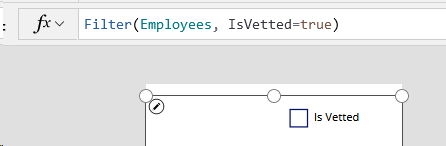
There's no practical workaround for this bug. To return all records where "IsVetted=true", we can get a bit further by using the criteria "IsVetted<>false" instead. However, there are two problems with this fix. First, it's not delegable (see the section beneath for more details). Second, "IsVetted<>false" will also returns NULL records, which explains why some records with "Is Vetted" appear in the screenshot beneath. Therefore, your data source must not contain NULL data.
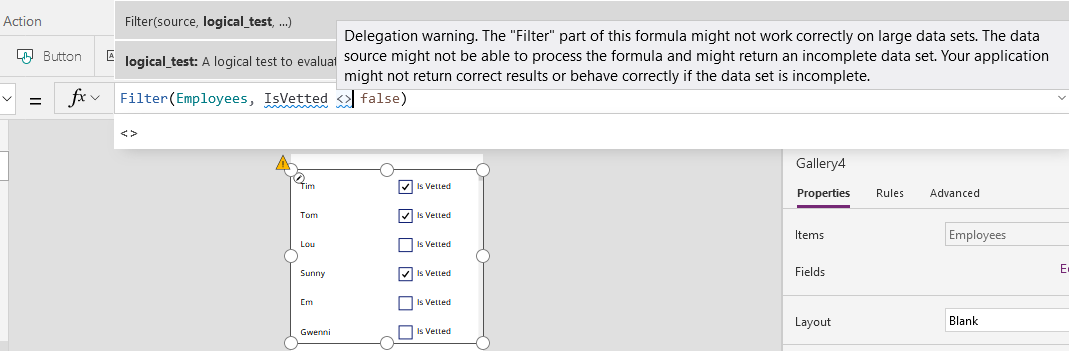
For now, the best recommendation is not to use SharePoint Yes/No fields. It's better to store Yes/No data in a text field instead. Here are a couple of links with more details:
3 - Poor Delegation Support
Query delegation support with SharePoint data sources is very limited. Searches against Choice and People type fields are non deletable. As I mentioned above, the <, <=, >, => operators are also non-delegable. Here's a screenshot of the warning that appears when we attempt to filter by a person field by email address.

As another example, here's a screenshot of the warning that appears when we try to return all records with a name that starts with "T". This is an illustration of another function that doesn't support delegation with SharePoint - the StartsWith function.
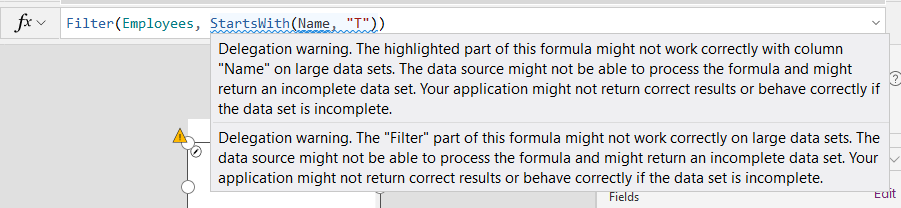
What these delegation limitations mean in practice is that if we want to carry out searches against these data types or with these operators, we won't be able to return accurate results if your SharePoint list holds more than 2000 records.
What's worse is that because the <, <=, >, => operators are non-delegable, we can't apply a common technique to overcome delegation problems, which is to load the source records into a local collection, and to carry out the query on the local collection.
Conclusion
SharePoint is a very popular data source, but filtering data can be challenging due to the issues in this post. If searching and filtering data is important, you should consider storing your data in SQL Server which provides much better support for delegation.
