SQL - Don't let this DateTime bug catch you out!
There is a long standing bug that affects comparative operators against SQL Server datetime fields. Occasionally, it still catches out some app builders and it is something that we should be aware of. In this post, we'll walk through an example problem scenario.
What is the reason for this error?
Therefore, the next step might be to monitor our function call. At first glance, this doesn’t seem very useful because all the entries report a success.
Conversion failed when converting date and/or time from character string
The cause of this error and how to fix it
If it’s not possible to change the data type of the table, an alternative is to create a view that’s based on the table, and to cast the data type of the DateTime column to DateTimeOffset.
Conclusion
Demonstration of bug
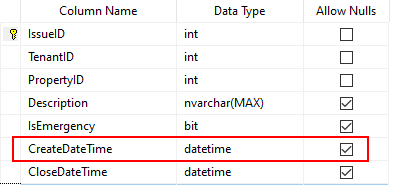
Our example app is based on a SQL server table of issue records. Our requirement is to retrieve all records with a CreateDateTime less than 2nd Jan 2020.Just to clarify our table schema, the CreateDateTime column is of data type DateTime.
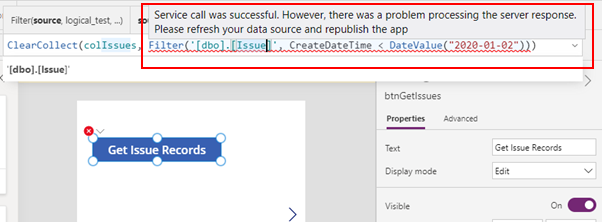
In theory, we can accomplish this easily by calling the Filter function, and collecting the results in a collection. This is the syntax we would use.
ClearCollect(colIssues,
             Filter('[dbo].[Issue]', CreateDateTime < DateValue("2020-01-02"))
)
However when we run this formula, it fails with this obscure error:
“Service call was successful. However, there was a problem processing the server response. Please refresh your data source and re-publish the app”.
What is the reason for this error?
Diagnosing this Error
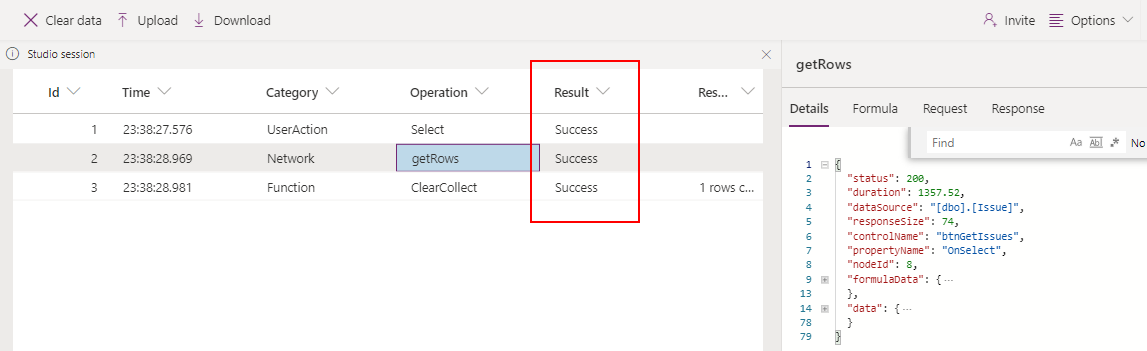
In practice, the first logical step we would take is diagnose this is to follow the instructions in the error message and to refresh our data source. If we do this, we'll find that it makes no difference. Republishing the app also isn’t an option because we’re currently working in the editor.Therefore, the next step might be to monitor our function call. At first glance, this doesn’t seem very useful because all the entries report a success.
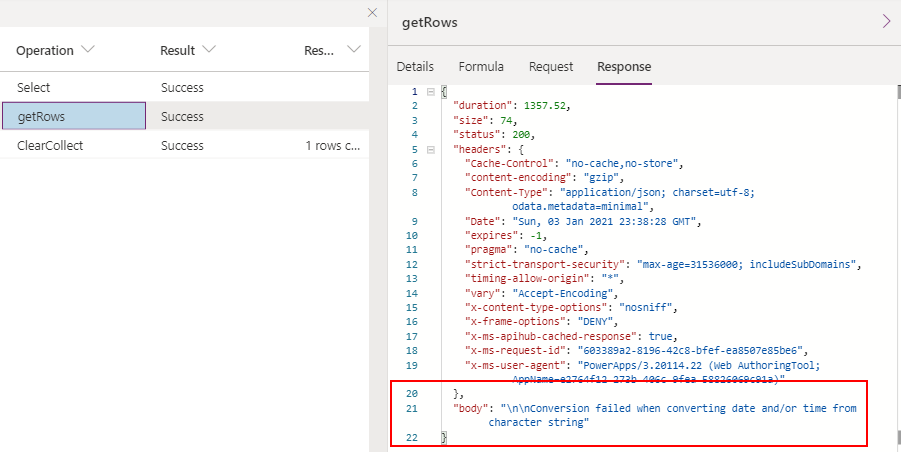
But if we drill into the response of the getRows operation, we can see an error message that reports the following:
Given that our CreateDateTime column is a DateTime column, why do we receive this message, given that our formula contains no string to date time conversion?
The cause of this error and how to fix it
We can actually trace this error back to a bug that affects the SQL Datetime equality operators. This is something that I mentioned here a few years ago.
https://powerusers.microsoft.com/t5/Building-Power-Apps/Filter-not-returning-all-results-from-SQL-Database/m-p/186042The fix for this problem is to convert the data type of the CreateDateTime column to DateTimeOffset. Not only will it prevent this type of problem, it can also mitigate problems that are related to date fields showing incorrect values, particularly when the clocks change due to daylight savings time.
Conclusion
There is a bug that prevents us from filtering SQL Datetime fields with equality operators. It's important to be aware of this because diagnosising this error in a typical way can cause more confusion.
With SQL Server, the best practice is to use the DateTimeOffset data type where possible.
