Data - Combine columns from separate tables into a single table
When working with data, there are occasions where it's necessary to combine or merge columns from separate lists, tables, or collections into a single structure. The columns in the source tables would contain the same number of rows and the requirement would be to match on ordinal or row index.
The image beneath illustrates this requirement. Here, there are two separate lists of region codes and region descriptions. The aim is to create a combined collection of codes and descriptions.
The image beneath illustrates this requirement. Here, there are two separate lists of region codes and region descriptions. The aim is to create a combined collection of codes and descriptions.
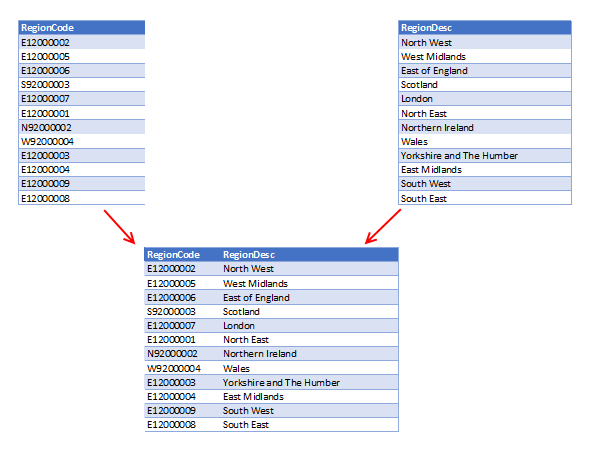
Where we often see this requirement is in cases where we retrieve data from web services. There are often times where the return data is split into separate tables. At this point, there will then be the subsequent need to merge the columns into a single structure.
Demonstration - Creating 2 separate collections
To demonstrate this scenario, the formula beneath creates two collections with an identical number of rows. The first collection contains region codes and the second collection includes region descriptions.ClearCollect(
colRegionCodes,
{'RegionCode':"E12000002"},
{'RegionCode':"E12000005"},
{'RegionCode':"E12000006"},
{'RegionCode':"S92000003"},
{'RegionCode':"E12000007"},
{'RegionCode':"E12000001"},
{'RegionCode':"N92000002"},
{'RegionCode':"W92000004"},
{'RegionCode':"E12000003"},
{'RegionCode':"E12000004"},
{'RegionCode':"E12000009"},
{'RegionCode':"E12000008"}
)
ClearCollect(
  colRegionDescriptions,
  {'RegionDesc':"North West"},
  {'RegionDesc':"West Midlands"},
  {'RegionDesc':"East of England"},
  {'RegionDesc':"Scotland"},
  {'RegionDesc':"London"},
  {'RegionDesc':"North East"},
  {'RegionDesc':"Northern Ireland"},
  {'RegionDesc':"Wales"},
  {'RegionDesc':"Yorkshire and The Humber"},
  {'RegionDesc':"East Midlands"},
  {'RegionDesc':"South West"},
  {'RegionDesc':"South East"}
)
How to merge columns from separate collections into a single table
The formula below shows how to combine the columns from the separate collections into a single table.
ForAll(
      Sequence(CountRows(colRegionCodes)),
      {
          RegionCode:Index(colRegionCodes, Value).RegionCode,
          RegionDesc:Index(colRegionDescriptions, Value).RegionDesc
      }
)
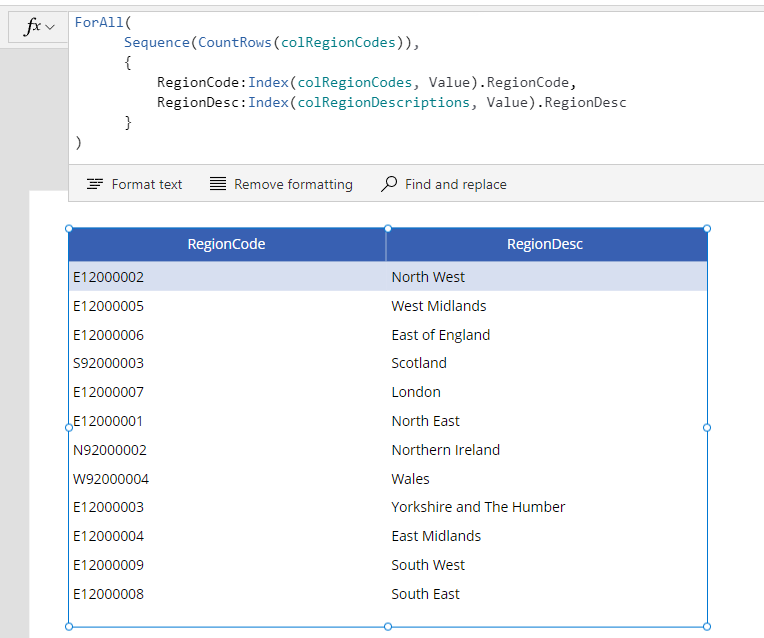
This formula creates a sequence of numbers based on the number of rows in colRegionCodes. The call to ForAll iterates over this sequence and for each number in the sequence, it retrieves the corresponding row from each collection by calling the Index function. It then retrieves the RegionCode and RegionDesc from the referenced rows.
Here's an illustration of what we see when we set the Items property of a data table control to this formula.
Conclusion
This post demonstrated the formula to merge or combine separate columns from different tables/collections into a single table by creating a numeric sequence and merging by index number.
