Power Up - Where to find missing Actions and Agent Flows menu items
Microsoft often likes to change the labels and menu items that are used in their products.
One particular change that has recently confused students of the Power Up program is the change in Copilot Studio terminology.
As shown below, in the screenshot beneath, the videos in the course refer to 'Actions'.
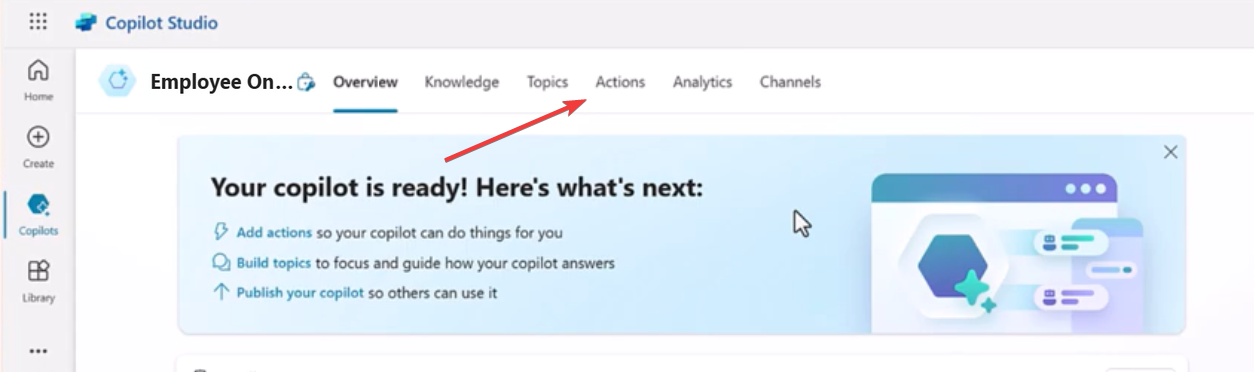
'Actions' have now been renamed to 'Tools'
As highlighted in the screenshot beneath, we see the renamed Tools menu. Another thing this screenshot highlights is with narrow screen dimensions, additional menu items are shown by clicking the '+' button. This may not be obvious and prevents some users from finding the menu items that want.
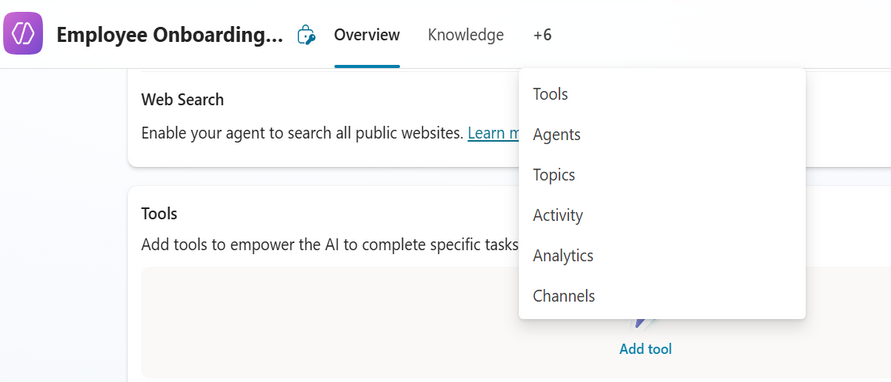
An additional rename is that 'Power Automate Flows' have been renamed Agent Flows'.
What was the reason for these name changes?
The reason for this change is to align Copilot Studio with the terminology that's used in generative AI and other products in the field of AI.
The industry uses the term 'tool' to describe external functions or APIs that a model can call to complete a task.
By renaming these menu items, the aim is to bring Copilot Studio in alignment with terminology that's more widely familiar.
