Data - Why is Dataverse so fast?
A key benefit of Dataverse is performance. It offers far better delegation support, meaning that we can properly query and filter data using operators that are not supported with other data sources such as SharePoint.
But it's not just better delegation support that Dataverse offers. Power Apps can connect to Dataverse more directly, without going through multiple networking layers. This means that out of all the connectors, the Dataverse connector is the fastest.
How does a canvas app connect to a data source?
The official documentation provides a great explaination of how a canvas app connects to a data source, and screenshots beneath are taken from this.
https://docs.microsoft.com/en-gb/powerapps/maker/canvas-apps/execution-phases-data-flow
With SharePoint and every other data connector (except Dataverse), a data retrieval operation must pass through the 'API management' and 'Connector' layers. The necessary transfer of data between these multiple layers is the process that adds extra time.
But it's not just better delegation support that Dataverse offers. Power Apps can connect to Dataverse more directly, without going through multiple networking layers. This means that out of all the connectors, the Dataverse connector is the fastest.
How does a canvas app connect to a data source?
The official documentation provides a great explaination of how a canvas app connects to a data source, and screenshots beneath are taken from this.https://docs.microsoft.com/en-gb/powerapps/maker/canvas-apps/execution-phases-data-flow
With SharePoint and every other data connector (except Dataverse), a data retrieval operation must pass through the 'API management' and 'Connector' layers. The necessary transfer of data between these multiple layers is the process that adds extra time.
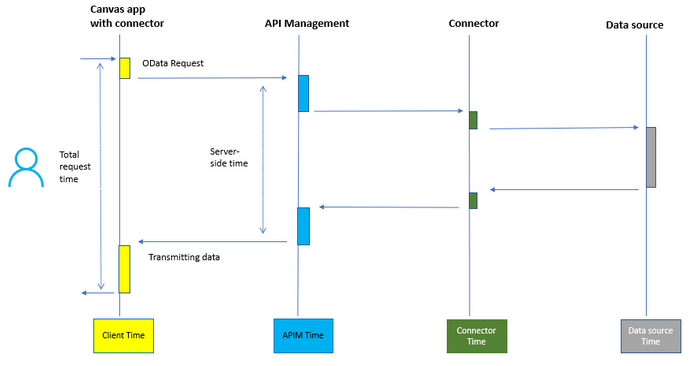
With Dataverse however, Power Apps can connect directly to the Dataverse database, which therefore minimises the data transfer time.
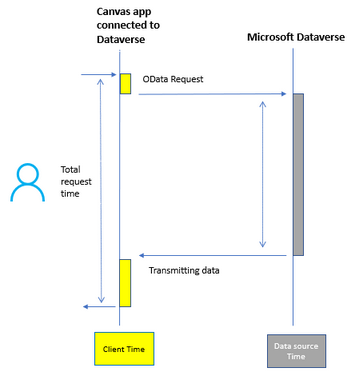
Does this mean that Dataverse is the fastest data source?
In many cases, the answer yes. However, app performance relies on more than just fast network connectivity.With Dataverse, it can be very difficult (or impossible) to perform complex queries on tables. These include queries that join multiple tables, union/combine multiple tables, group data to produce aggregations (such as averages), and queries that perform 'not in' type searches (eg, selecting rows from a customer table with no related rows from an order table).
The workarounds for these limitations often require the collection of and processing of records client-side, and/or to rely on non-delegable operators. This is one area where SQL Server outperforms Dataverse by providing support for SQL views, which enable us to very efficiently carry out these types of operations. Therefore, if we have the requirement to carry out this type of prcoessing in a canvas app, SQL Server can offer better all-round performance.
Conclusion
Dataverse offers great network performance because a canvas app can more directly connect to a Dataverse database, and avoid the 'API management' and 'Connector' layers.
