Dataverse - How to work around the error "multiple levels of many-to-one relationship expansion aren't supported"


I help mentor students through the Power Up program and on a few occasions, I've been asked to clarify formula that recurses multiple tables.
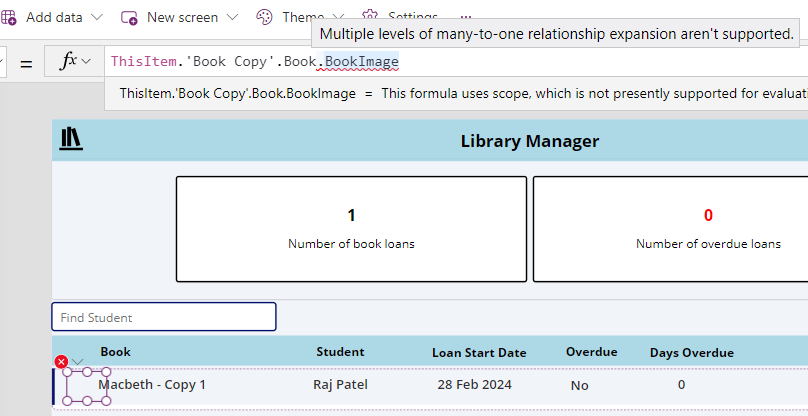
In one part of the demo app, an attempt to display related records can result in the error "multiple levels of many-to-one relationship expansion aren't supported" (highlighted in the screenshot beneath). What's the cause of this error, what exactly does it mean, and how can we work around it?

The remainder of this post explores these questions in more detail.


How to recreate the error "multiple levels of many-to-one relationship expansion aren't supported"

The app for this course is based on a library system. The data model is shown in the diagram below.

The notable features are as follows:

  • Book details (including book name and a book image) are stored in a table called Book
  • There can be multiple copies of each book - the BookCopies table stores the details of each copy.
  • When a copy of a book is loaned out, the loan details are stored in a table called Loans

To generate this error message we create a gallery with the Items property set to the Loans table. For each row in the gallery, we use an image control to display the book image. We attempt to retrieve the image by referencing the parent tables like so:

ThisItem.'Book Copy'.Book.BookImage

This formula will generate the "multiple levels of many-to-one relationship expansion aren't supported" error.

The reason for this error is because with Dataverse, it's not possible to directly reference table properties that are 2 or more parent levels above the current table.

How to workaround the "multiple levels of many-to-one relationship expansion aren't supported" error

Since it's not possible to directly reference table properties 2 or more parent levels above the current table, the workaround is to explicitly lookup the BookCopy record for the loan record and to use that reference to access the book image that belongs to the parent book record. Because we're navigating beyond no more than 2 parent levels this strategy will work.

The implementation of this technique looks like this:

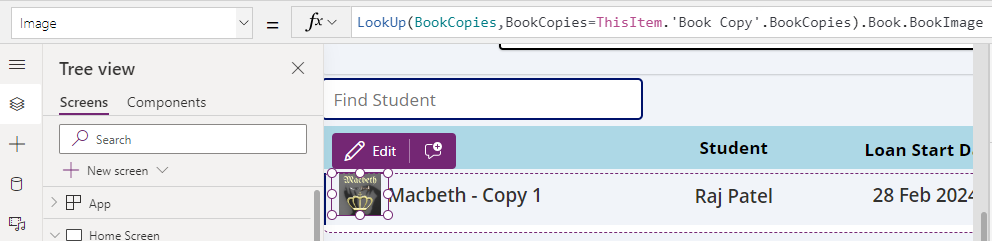
LookUp(BookCopies,BookCopies=ThisItem.'Book Copy'.BookCopies).Book.BookImage
With this formula, the book image now displays correctly as shown here:

Although this technique works, the syntax that's used is highly confusing and many students seek clarification on what this formula means. 

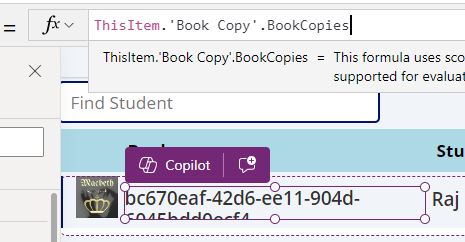
This formula calls the LookUp function to lookup a single record from the BookCopies table - this part is reasonably obvious. However, the most confusing part is the reference to ThisItem.'Book copy'.BookCopies in the criteria of the lookup. The naming might suggest that BookCopies is a related child table of 'Book Copy' but this isn't the case. BookCopies is the identifier that returns the ID of the record in the BookCopies table (which is of data type GUID). With Databaverse, the built in behaviour is that the property that matches the table name returns the ID (as illustrated below). 


Since we can retrieve the unique ID of the parent BookCopies row, we can use this to look up the record in the BookTables. In the remainder of the formula, '.Book' returns the parent book record that's associated with the 'Book Copy' record, and '.Book.BookImage' returns the book image.

Conclusion

When we attempt to directly reference a table property that's 2 parent levels above the current table, we encounter the error "multiple levels of many-to-one relationship expansion aren't supported". The workaround for this error is to explicitly lookup a related record at a level that doesn't exceed 2 parent levels, and we can use this record to access the target field value.

Related posts

Dataverse - How to set yes no values with checkbox- Walkthrough
January 29, 2025
Dataverse - Add image column missing when creating table - how to fix
January 19, 2025
Data - How to view the progress and status of a Dataverse CSV/Excel Import
January 15, 2025
Error - Diagnosing the error "Network error when using the Patch function" when saving data with a form
May 05, 2024
Dataverse - The easiest way to modify Dataverse data outside of Dataverse and Power Apps
February 18, 2024
Dataverse - How to use a checkbox control a set a yes/no field in Dataverse
July 10, 2023
Dataverse - How to create Entity Relationship diagrams
January 22, 2023
Dataverse - How you can more quickly bulk update data using the SQL language
January 14, 2023
Dataverse - How to fix the bug in the 'Business Rules' editor that prevents numeric values from saving
January 05, 2023
Dataverse - What are the benefits, and how to create formula columns
July 20, 2022
Dataverse - How to sort the available choice items from a choice column
May 12, 2022
Error - Unable to modify Dataverse tables with error message, Language id should not be null
September 27, 2021
Dataverse - How to retrieve FetchXML or SQL for Dataverse views
July 13, 2021
Data - Why is Dataverse so fast?
June 15, 2021
Dataverse - How to create and use Dataverse views in Canvas Apps
June 09, 2021
Dataverse - How to filter Dataverse choice columns
June 07, 2021
Dataverse - How to switch to the classic designer when the option is not available
May 26, 2021
Licensing - What are Dataverse Restricted tables?
March 26, 2021
Media - How to save and work with microphone recordings
March 09, 2021
Dataverse - how to access tables from another environment
February 23, 2021
Dataverse - How to Patch the 5 most complex data types
January 19, 2021