Formula - How to calculate compound interest
When building financial applications, there can often be a requirement to calculate compound interest.
With Excel, the FV function can assist with this task. Unfortunately, there is no equivalent function in Power Apps or Power FX.
Therefore, the content of this post describes how to carry out this calculation from Power Apps.
Compound interest - an example calculation
For this post, let's take the following example question:
How much would $100 be worth when invested for 5 years at 2% (with interest paid monthly 12/year)?
To determine the answer, let's take one of the online calculators that we can find on the web. The screenshot below is taken from the following site:
https://www.thecalculatorsite.com/finance/calculators/compoundinterestcalculator.php
This shows that the result is $110.51 at the end of the 5-year period.

How to calculate compound interest in Power Apps
The generic formula to calculate compound interest (as described from the above site) looks like this:
A = P(1+r/n)^nt

A = the future value of the investment or loan
P = the principal investment or loan amount
r = the interest rate (decimal)
n = the number of times that interest is compounded per period
t = the number of periods the money is invested for
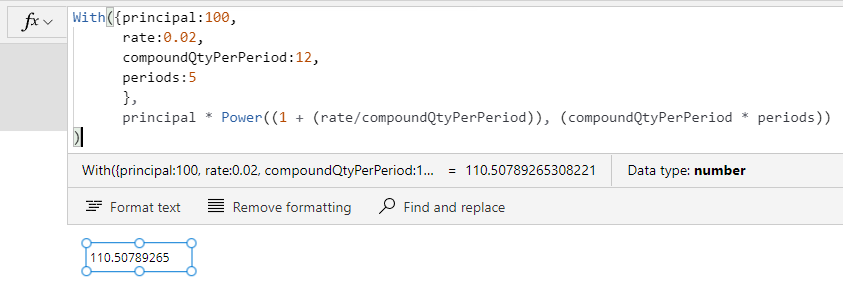
The equivalent formula in Power Apps would therefore look like this:
With({principal:100,
      rate:0.02,
      compoundQtyPerPeriod:12,
      periods:5
      },
      principal *
        Power((1 + (rate/compoundQtyPerPeriod)), (compoundQtyPerPeriod * periods))
)
With this formula, we would substitute the values inside the 'with' block like so:- principal - the principal investment/loan amount
- rate - the interest rate (eg - 2% would be expressed as 0.02)
- compoundQtyPerPeriod - number of times the interest is compounded per period. (in this example, 12 to express that the interest is compounded monthly)
- period - the number of periods the money is invested for (5 in this example)
If we test this expression from Power Apps, we see that it produces our expected result of 110.51 (rounded).
Conclusion
Where there is a need to calculate compound interest, we can use the formula in this post to carry out the calculation.
